 Home
Home
Introduction
Who's this book for?
This book is for anyone interested in programming, who has found it difficult to get started.
What this book covers:
- Why program?
- The basic information needed to get started with programming.
- The different ways of programming.
- The art of Googling.
- Picking a programming language.
- Fields to program in.
What this book does NOT cover:
- How to program in a specific programming language
- Advanced programming theory
Programming is a wide, complex subject. And it isn't easy to start programming, because the terminology
used can often be confusing. This book aims to fill in many of the gaps, and empower readers to
overcome these barriers and become skilled Google users.
Maths
You might've heard that you need maths for programming. This is kinda true, but also not really.
You need maths if you do AI or data science. But you don't need maths to make a website.
There is some mathematical theory in programming, but it's not complex, so don't worry. The maths
you need for programming depends on the subject, but in general, it's not hard.
Why program?
Why should you program? This is the first important question to ask yourself. Are you interested in programming?
Perhaps you're a student? For work?
Whoever you are, programming is an enriching subject, that once understood, will be a useful or even fun tool to use.
Programming may appear an impossible task, but don't let that affect you. It's just hard to get started.
ℹ️ Some subjects are very difficult in programming, but you'll find a lot are easy.
The practical uses of programming:
Programming is applicable in a variety of fields and sometimes you don't even know you're using a program.
Programming is used in engineering, medicine, science, making applications, websites and plenty of others.
In regards to what programming can achieve, the answer is ”anything.”
Any task you can think of, that can happen, can be programmed.
Websites, applications, operating systems and general appliances are or can be programmed.
In short, programming is useful if you need to make something happen.
Programming as a hobby:
Programming can be a hobby, too.
It can be an eye-popening activity,
that will change your thinking for the better. And help you understand things around you.
It's not easy to describe it.
Programming basics
Thinking programmatically:
The first step to get into programming is to understand how to think about it.
First off, a "program" is a series of instructions to be executed by a computer. This definition has some programming terms. Simply, a "program" is a bunch of code that can be ran by a computer. Sometimes, programs are used
the same as "source files," which are files that contain code written in a programming language.
So a program is what the computer understands and a source file is what you write. It's not too important to disting
uish these terms at this point, but you can.
ℹ️ Collections of source files or programs that you might use to write a program can be known as "libraries"
or "modules." Note that "libraries" have a shorthand: "libs."
So now you have a basic idea of how files are organised when programming. Another important part of thinking like
a programmer is to consider everything to be ordered instructions you give the computer. You tell the computer
to show "Hello World!" on the screen, it shows that. Think of it as telling the computer to "do this, then do that."
ℹ️ You aren't telling the computer what to do in most cases. You're telling the programming language
you're using to do that for you. If this doesn't make sense, do ignore it.
Learn what's known as "computational thinking" if necessary; it's very useful.
Understanding what coding really is:
Coding has a fuzzy definition. But I would define it as creating a representation of what can end up being
a program later. So, things like Scratch still count as code and writing code in files counts too.
When you program, make sure to think of it as that.
Writing code:
To recap:
- Program: something that the computer can execute, usually generated from a source file
- Source file: a file that is given to a programming language to make a program
- Programming: creating a representation of what can end up being a program.
This won't help you much, yet. So, let's understand how to write code. In general, you'll
find these patterns in most programs.
- Functions
- Arguments
- Parameters
- Variables
- Constants
- Immutables
- Mutables
- References
- Types
- Strings
- Integers
- Floating-point numbers
- Lists and arrays.
- Tuples
- Control flow
- If statements
- While loops
- For loops
- Arithmetics: they're just maths.
This can look overwhelming. But once you get these, you'll find reading other docs a lot easier. Let's begin with
the simplest: variables. Variables are like pronumerals in maths, only they can be multiple characters.
Variables
A variable is a name for a value. For example, imagine a variable named pi with a value of 3.14159.
Now, when you write pi, you get 3.14159.
There are 3 basic kinds of variables, and they can be confusing. The most common are mutable variables. For example,
you define a variable named x as 5. Then, you change x to 2. Of course, because programs execute in order,
all code before you changed x to 2 will result in 5. Unlike maths, variables can be defined in terms of themself.
So, if you had changed x to be x + 1, it would have been 5 + 1, which is 6. Think of "mutable" as "mutate,"
which means change.
The other kinds, immutable and constant variables can't change. They're not the same, but I won't confuse you.References
References are simply when you write a name for something, like an identifier or a function.
Not much else to say.Functions
Functions are used to name and reuse bits of code you have written. For example, imagine a program that adds
5 and 2 and outputs it, but you want that to happen many times, not just once. In this case, one solution
would be to use a function. You'd name your function whatever you want, with parameters and a body.
Parameters are variables that can take arguments from the programmer calling the function. Arguments
are just any value that will make sense in the function's body, at the simplest level. The function's body
is the code inside it.
For example, imagine a function named add1 with the parameter num and the body
return num + 1. If you call add1 with 1 as the argument for the parameter num, then you'll get
2. return usually means what the function should result in.
This is kind of similar to functions in mathematics, for example f(x) = x + 1.
Control Flow
I want something to happen only if a certain condition is met. How do I do that? By using what is called an if
statement. An if statement is composed of a condition and a body. A condition is exactly what it sounds like.
For example, an if statement with the condition that pi > 3 and a body that outputs "Pi is greater than 3"
would run, only if pi is greater than 3. if statements can be accompanied with else and else if bodies.
else only happens if all conditions fail, and else ifs only happens if all conditions above it fail.
What about if I want something to only happen while a condition is met? That's why the while keyword exists,
and it's pretty much the same as if in terms of use.
What if I want something to happen a set number of times? Here, you can use a for loop. The way they're used is
different in different programming languages, but generally, there is what's known as a control variable and the
number of iterations. A control variable is a variable that changes every time the body of the for loop is repeated
that you can access. Iterations are the repetitions of the body of the for loop.
Collectively, these are called control flow.
Types
Types are something you will hear a lot about in programming.
- Strings: text
- Integers: whole numbers, negative or not
- Floating-point numbers: numbers with a decimal place
- Lists and arrays: multiple same-type values that can be referenced using one name
- Tuples: multiple values that can be referenced using one name
There's also "typing," which doesn't refer to writing in a computer, but how types are default with.
- Dynamic typing: a variable's value can change type, and a function's parameters' values as well as its
resulting (return) value can change type.
- Static typing: a variable's value cannot change type, a function's types cannot change
Different ways to program
In programming terminology (the terms used), different ways to program are known as paradigms.
The most intuitive in my opinion is procedural, imperative programming, which is what you have probably been using.
- Imperative: concerned with the "how" of the program
- Procedural: oriented towards programming-style functions. It is a sub-paradigm of imperative.
There's also object-oriented programming, which is quite common too.
- Object-oriented programming: oriented towards "objects." It is a sub-paradigm of imperative.
And there are declarative programming sub-paradigms, such as functional and markup.
- Declarative: concerned with the "what" of the program.
- Functional: oriented towards mathematical-style functions and immutable variables. It is a sub-paradigm of declarative.
- Markup: used to show meaningful imagery.
This book mainly focuses on imperative programming, and I suggest you stick to it for now.
It's not in the scope of this book to discuss at length programming paradigms, but if any interest you at some point,
then do search them up. I'll discuss a little more in the "Picking a programming language" chapter.
The Art of Googling
What really is googling? To keep Google happy, I define googling as the use of the Google search engine to get
information on any subject. And programmers google a lot more than you'd think. In fact, googling is the most
important skill for a programmer to have. You google to learn a new programming language, a new library, to figure
out what's wrong with your code, to find help and so much more. So, how do you google effectively? Googling is a skill
that can be cultivated over years of experience. But the good news is, because you aren't yet a skilled googler,
you can boost your skill quickly.
How do you do that? By using the google search modifiers syntax. They might have their own name,
but I'll just use this. "Syntax" simply means the way something is written. Collectively,
English's syntax is composed of its grammar, punctuation, vocabulary, etc.
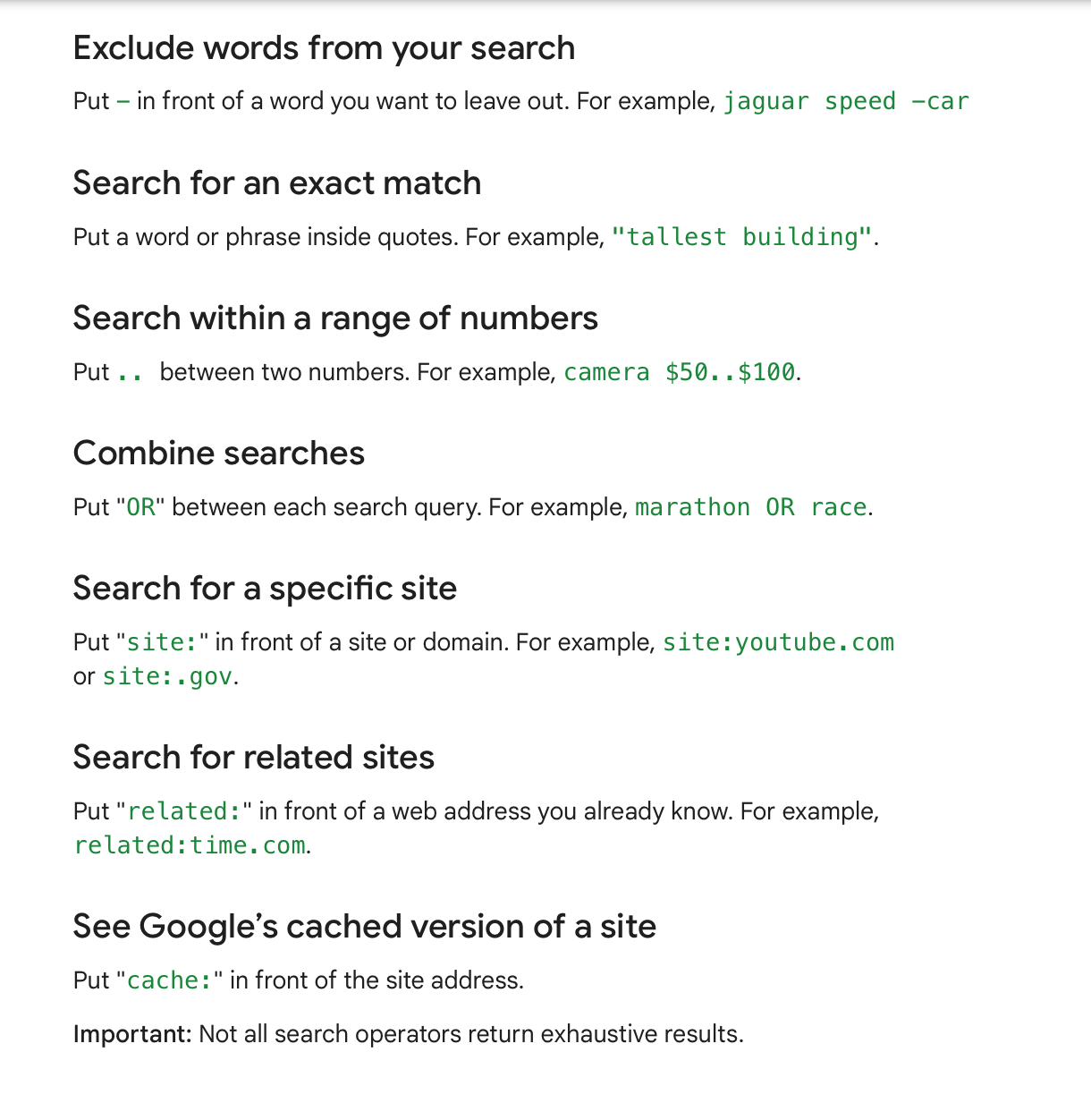 I got this image straight from Google, and you can
see them there if you'd like. This image does not show all search modifiers, but I doubt you're going to be
looking at social media for answers to your programming problems, save for Reddit. Do you ever find that when you're
searching for something, you keep getting unrelated results? Or perhaps Google ignores some of your search query?
I got this image straight from Google, and you can
see them there if you'd like. This image does not show all search modifiers, but I doubt you're going to be
looking at social media for answers to your programming problems, save for Reddit. Do you ever find that when you're
searching for something, you keep getting unrelated results? Or perhaps Google ignores some of your search query?
Both these are problems I frequently encounter while searching. But the solution's easy. If you don't want Google
to ignore some words in your search query, wrap it in quotes, like this "GitHub pages". This will only return results
that have the text "GitHub pages" exactly; the word GitHub has to follow the word pages. If you just want results
that contain both, then use the search query "GitHub" "Pages".
Let's say you keep searching for stack exchange,
i.e.: exchanging a stack. This is a model for search queries you're likely to make if you forget some terms. You'll
keep getting results from StackExchange, the website and other websites that talk about it. So, now you try
exchanging a stack. Alas, that changes nothing. A good idea here is to eliminate results containing "StackExchange."
So, to your new search query, add -stackexchange. And now, you've found your result: swapping stacks.
Googling is tough. But here's a short, simple list on when you should use certain search modifiers and techniques.
- Quotes: when you have an error. Be careful not to include the part where it says where the error happened
in your code, though.
- Minus: When you keep getting a result you don't want.
site:foo.bar: when you want to find an answer to a question that you lost.before:date and after:date: when the results you get are useless because they're too new or too old.
What websites to look for:
It depends on the programming language you're using. But for most programming languages, try to find StackOverflow
answers, GitHub projects or issues, and really any website you find.
Picking a programming language
This is a hole a lot of emerging programmers fall into, they just can't pick which language to get started. Well,
I'm here to help with that. Picking a language is hard, because there are so many options. "I wanna do JavaScript,
so I can do web development, but I don't like the language." Or "I wanna do Python because it has great libraries,
but I don't like it."
Lots and lots of things like that.
The real answer is, it honestly doesn't matter what your first language is.
I tried starting with JavaScript, but I found it too confusing and ended up starting with Python. To this day,
Python is the language I know most. But learning it was really difficult. At some point, I decided why don't I also
learn other programming languages? So I tried. It was hard, but a lot easier. And now, I found learning Haskell,
regarded as a difficult programming language, quite easy.
What I mean to say here, is you should start with whatever programming language you lean towards, even if you have
doubts about it.
My controversial opinions:
I have some rather controversial opinions about which programming language to start with. This is the nature
of anyone helping others pick a language to start with. I recommend beginning with a simple programming language,
like Python, Lua, or Ruby. Start with a dynamically typed programming language, because types are a difficult
concept.
Don't start with something like C#, Java or C++. C# and Java require you to understand object-oriented
programming, which is a difficult concept for beginners and is highly controversial in the programming community.
And they're both just simply hard. C++ is very difficult in comparison to other languages, too. My advice
would be to start with a simple language, like one of the three I listed, and then if you want to, work your way
to more difficult languages.
In truth, you don't always need to use difficult programming languages. You might hear that Python and Ruby are slow.
And that's absolutely true. They are slow. But in most cases, it doesn't matter. Your user likely won't care.
And Lua's really fast with LuaJIT, although Lua is not very popular. There are plenty of fast, simple programming
languages, like Go, Julia and more. But unless you like their syntax, I'd begin with the simplest language
I can find.
Obviously, this doesn't mean begin with HTML & CSS, because they're markup languages and likely
won' help you understand others. Not to mention they're pretty frustrating compared to other code.
Picking a paradigm
Another hole programmers often fall into is choosing a paradigm. My advice is to do what you like. Do
procedural programming if you like it, do object-oriented programming if you like it. But I'll try to give
an overview of the advantages and disadvantages of some of the most popular paradigms.
Procedural:
Advantages:
- Intuitive and simple
- Widely supported
Disadvantages:
- Rare for some fields, like GUI.
Object-oriented:
Advantages:
- Used for GUI
- Good for making libraries
- Popular
Disadvantages:
- Complex
- Clutters code (verbose)
Functional:
Advantages:
- Very easy to debug
- Concise
Disadvantages:
- Complex to get started.
- Less widely supported.
A lot of people will disagree with me here. I ignored any advantage or disadvantage that pops up in all 3.
My advice would be to begin with procedural. It's really the simplest. Then you can dive into one of the other
paradigms once you're experienced enough.
In summary: pick what you like and don't worry about it.
Fields to program in
I'll just list a few popular programming topics.
- App development: GUI (generally object-oriented, but you can use other paradigms).
- Web development: Frontend (what the user sees) and backend (managing the server and taking requests from the frontend)
- Algorithms and data structures: I really can't explain it, so search it up.
- Parsing: breaking down language into meaningful units (I have a guide on this in my website).
- Concurrency: dealing with multiple programs running at the same time.
and many more. It again depends on the language.